Atelier
A romantic digital workspace for heart-centered creative professionals — wedding planners, floral designers, and the people whose work is emotional labour.
- Role
- Sole designer — concept, product definition, visual direction, UI
- Discipline
- UX design · UI design · Visual direction
- Platform
- Web application
- Tools
- Figma, Auto Layout, Design system
An exploratory product concept. The users and pain points are a stated design premise, not validated research.
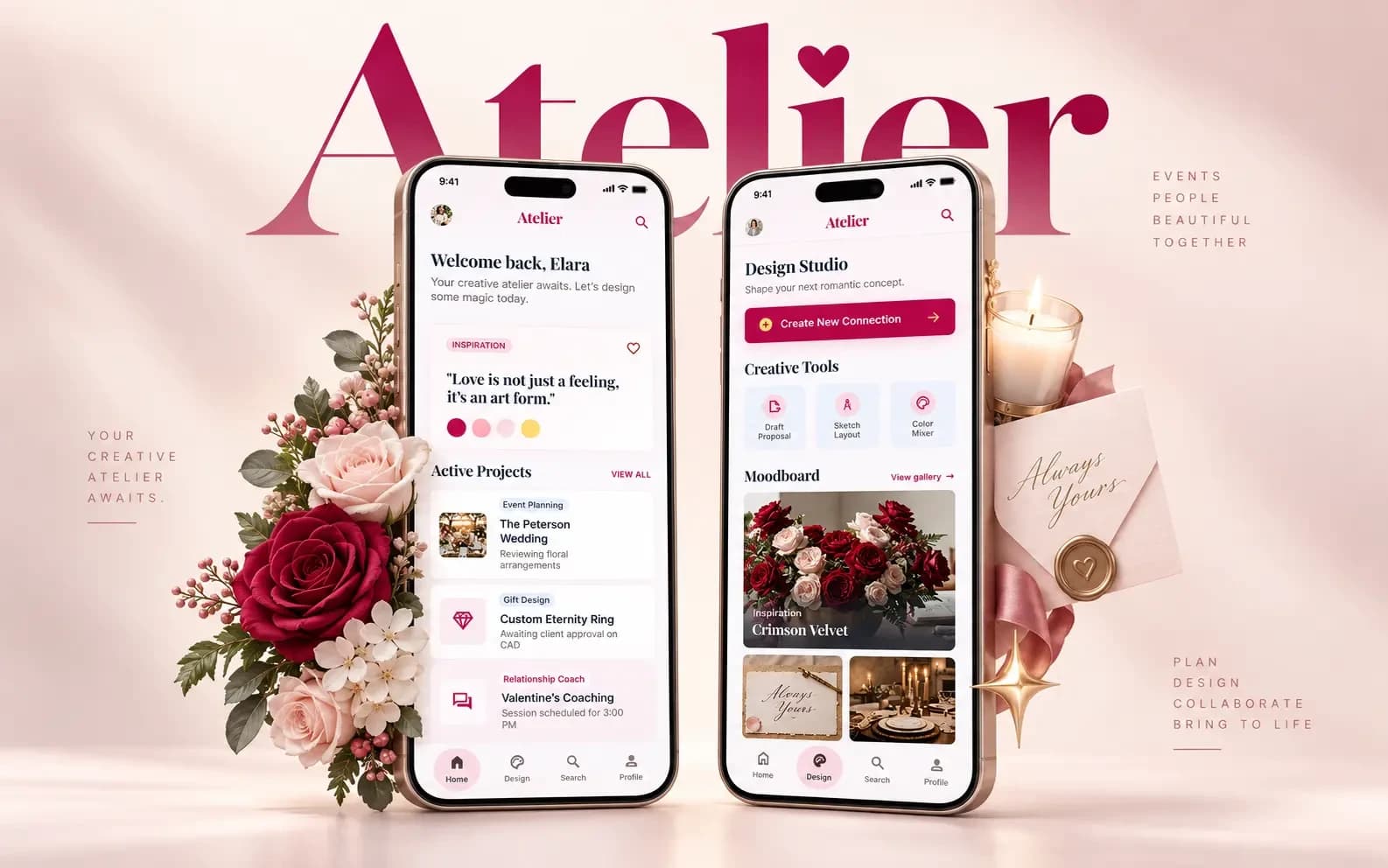
Overview
Context
Wedding planners, relationship coaches, floral designers and bespoke gift makers run real businesses with deadlines, clients, budgets and suppliers. The tools they use to do it were designed for software teams.
Problem
Their work is fragmented across a project tool, a moodboard app, a chat thread, and a shared drive — and none of those tools have any concept of the thing that actually holds the project together, which is how it is supposed to feel.
Objective
Explore what a workspace looks like when visual inspiration and emotional intent are first-class parts of the project, not attachments to it.
What I did
- Defined the concept, the audience, and the product premise
- Designed the project organisation, inspiration, and client-work structure
- Developed the visual direction and the high-fidelity interface system
The premise
Generic productivity software is not neutral — it is opinionated in the wrong direction.
A task board says the work is a queue of items to close. For a wedding planner, that is not wrong so much as beside the point: the palette, the mood, the flowers and the light are the project, and they sit in a different app entirely.
The fragmentation is the cost. Inspiration lives on one platform, the plan on another, the client conversation on a third, and holding them together is unpaid work that falls on the person least able to spare the time.
Atelier starts from a simple premise: if the output is emotionally expressive, the workspace should be able to hold that expression, and the tools for organising it should not feel clinical.
Who it is for
The intended users, and the frictions the concept sets out to address.
- 01
Wedding and celebration planners
Coordinating suppliers, timelines and budgets while holding a coherent aesthetic direction across every one of them.
- 02
Floral and bespoke designers
Work that is visual first and administrative second, currently handled by tools that invert that order.
- 03
Relationship coaches and gift makers
Client work that is personal and sensitive, needing organisation that does not feel like a support ticket.
- 04
The shared frictions
Fragmented planning tools, inspiration scattered across platforms, clinical productivity software, difficulty organising emotionally expressive client work, and awkward collaboration and networking.
How the workspace is organised
Four surfaces, with inspiration sitting alongside the plan rather than beneath it.
- 01
Project
A client engagement as a single home: timeline, suppliers, budget, and the direction it is meant to take.
- 02
Inspiration
A visual canvas that belongs to the project, so the mood and the plan stay in the same place.
- 03
Client work
The shared surface a client actually sees — presentation-quality by default, not a task list with permissions.
- 04
Collaboration
Bringing suppliers and collaborators into a project without handing over the whole workspace.
The interface
High-fidelity exploration of the workspace surfaces.
projects/atelier/project-workspace.webpprojects/atelier/inspiration-canvas.webpprojects/atelier/client-view.webpVisual system
Warm, editorial, and deliberately unlike a project-management tool.
Typography
- A serif display face for project and section titles, giving the workspace an editorial voice
- A clean sans-serif for everything operational — dates, fields, controls, and tables
- The contrast between the two is the identity: expressive headings, unfussy working text
Colour
- A soft, warm base rather than the grey neutrals of standard productivity software
- Accent used for primary actions and the current project, never as decoration
- Space and typography carry the mood, so client content is never fighting the interface
Components
- Project card: direction, timeline, and status in one glanceable unit
- Inspiration tile: image, note, and source, arranged on a free canvas
- Supplier row: contact, status, and the deliverable it is attached to
- Client presentation block: the reusable unit the client-facing view is built from
Interaction states
- Editing and presenting are visually distinct modes, so nothing internal leaks into a client view
- Collaborator access is scoped per project and stated plainly in the interface
- Empty states show what a well-formed project looks like rather than an empty box
Exploratory concept
What has and has not been validated
Atelier is an exploratory product concept. It has not been built, released, or tested.
The users and pain points described above are the premise the concept was designed against. They are reasoned assumptions — no interviews, surveys, or usability sessions have been carried out, and they should not be read as research findings.
The persona work, user journeys, information architecture, collaboration flow, and any testing remain to be done. Until they are, this project is best read as visual direction and product thinking rather than a complete UX case study.
Outcome and reflection
What Atelier demonstrates is a point of view: that software for emotionally driven work can be organised and expressive at the same time, and that the visual direction is part of the argument rather than decoration on top of it.
What it needs next is the least glamorous part. Before another screen is drawn, the premise needs to meet actual wedding planners and florists — because the entire concept rests on an assumption about their frustrations that I have reasoned my way to rather than heard.
Designing it taught me how easily an appealing visual direction can outrun its evidence. Keeping this project honestly labelled as a concept is part of the work, not a caveat bolted onto it.
Contact
Have a product idea worth shaping?
I’m open to UI/UX and product design roles, and to freelance design and frontend projects. Tell me what you’re working on.